Volleyball team composite template and memory mates
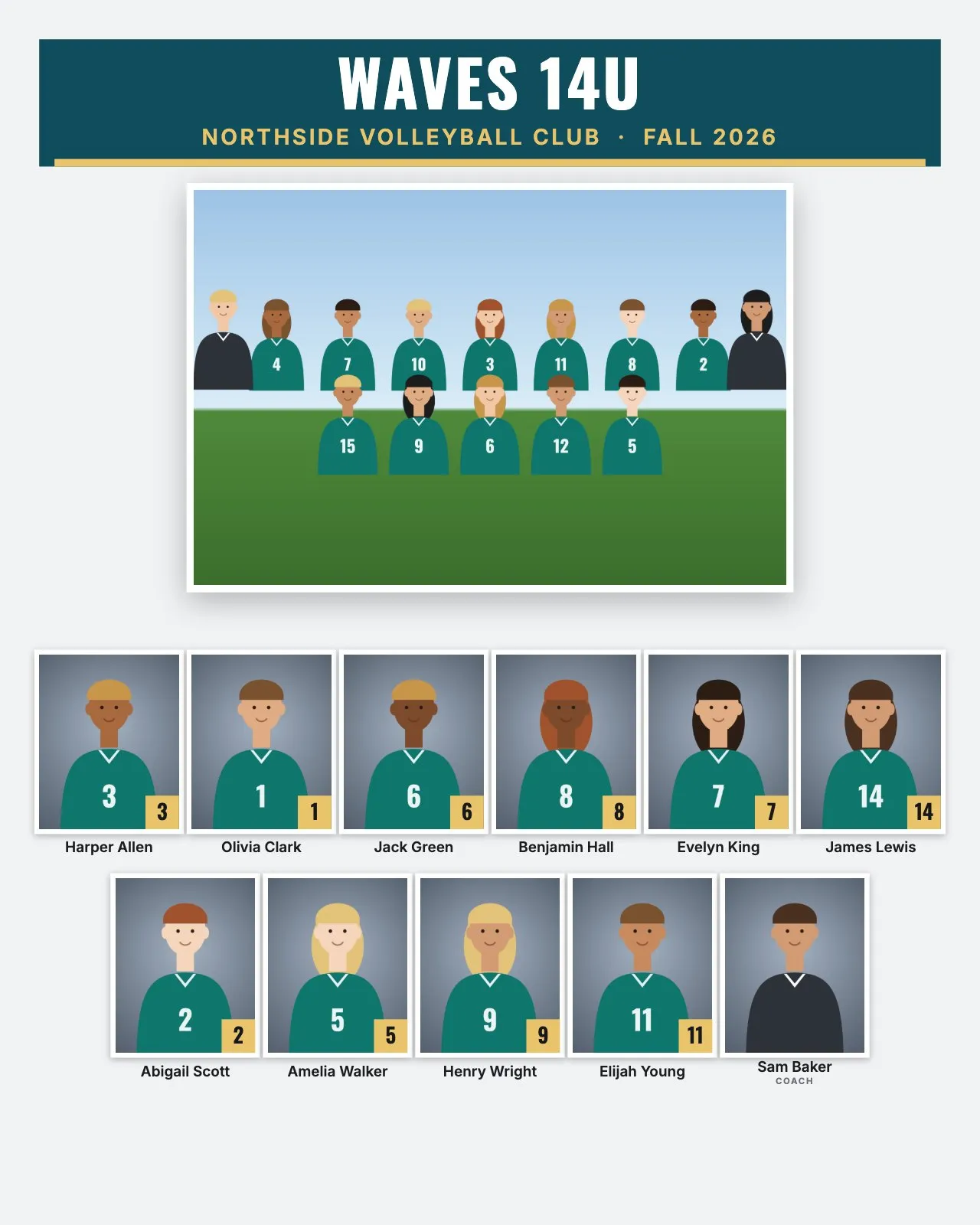
Volleyball has two big markets: school teams in the fall, and club teams that start with winter tryouts and play tournaments into the summer. Clubs often have a dozen or more teams by age group, which makes them a good fit for building every composite at once. Rosters are small, so the right print size matters.
Volleyball roster sizes and the layout
| Level | Typical roster | Good size and layout |
|---|---|---|
| Youth club | 10 to 12 | 8 × 10" portrait: 11 to 13 people in 2 or 3 rows, headshots about 1" to 1.14" wide |
| School JV and varsity | 12 to 15 | 8 × 10" in 3 rows, about 1" wide, or 14 × 11" in 2 rows, about 1.25" wide |
Clubs usually name teams by age and color, like "14 Navy" or "16 Black". Use that as the folder name and it prints as the team name.
Best composite size and rows for volleyball
Volleyball teams fit 8 × 10" portrait well. With 11 to 13 people, Automatic gives two or three rows of headshots about 1" wide or more, under a good-sized team photo. On 10 × 8" landscape the same team gets smaller faces, about 0.8" to 0.9". Leave Rows on Automatic unless you want a specific look.
Jersey numbers or positions?
Numbers. Positions like setter, outside hitter and middle change between teams and seasons, and RosterFrame prints names and numbers only.
The libero wears a contrasting jersey. That looks right on the composite. "Match jersey colors" reads the jersey area of up to 16 player headshots, so one libero jersey doesn't throw off the team colors. If it picks the wrong color, set Main and Accent by hand.
Picture day tips for volleyball
- Find a quiet corner. Club picture days often happen at practices or tournaments in big multi-court facilities. Set up a backdrop away from the courts and the foot traffic.
- Use your own light. Facility lighting is often uneven and colored. Flash or strobes plus a custom white balance keep skin tones the same across every team.
- Even out the heights. Volleyball teams can include very tall players. Use a posing stool, or adjust the camera to eye level for each player.
- Knee pads and hair: for the team photo, all knee pads up, all down, or all off. Same ponytail style for headshots, behind the shoulders.
- Team photo: back row standing, front row kneeling, ball in front. Watch for net shadows if you shoot on court.
Memory mate and trading card ideas for volleyball
- Player card memory mate (8 × 10" or 5 × 7"): a portrait holding the ball, with a name banner and number badge.
- Trading cards (2.5 × 3.5"): some club players swap them at tournaments.
- Buttons (2.25" or 3"): for parents at long tournament weekends.
- Team poster (18 × 24"): for the club's gym or the season-end party.
How to make volleyball composites in RosterFrame
- Make one folder per team, named like
14 NavyorWaves 14U, with the team photo asTeam.jpg. - Name headshots like
Evelyn_King_7.jpg, or keep camera names and use a roster CSV from the club's registration list. - Open RosterFrame and click "Choose team folders". Pick the club folder.
- On the Composite tab, choose Classic or Clean and 8 × 10" portrait.
- Click "Match jersey colors", then enter the club name and the season.
- Check the Memory mates and More products tabs, send coaches the name check sheet, then export all teams.
Every headshot gets the same crop, so faces line up across the grid. If one photo is off, open it from the roster and drag or zoom to fix just that one.
Recommended settings
| Style | Classic or Clean |
|---|---|
| Print size | 8 × 10" portrait, or 14 × 11" for school teams of 15 or more people |
| Rows of headshots | Automatic |
| Order | By jersey number or by last name |
| Label for coaches and staff | Coach |
| Team colors | Match jersey colors, or set by hand if the libero jersey confuses it |
Composite guides for other sports
Teams without jersey numbers? See dance, cheer and swim team composites. All guides are on the guides page.
Try it with your own photos. Free during beta, no signup, runs in your browser. Your photos never leave your computer.
Open RosterFrame