Soccer team composite template and memory mates
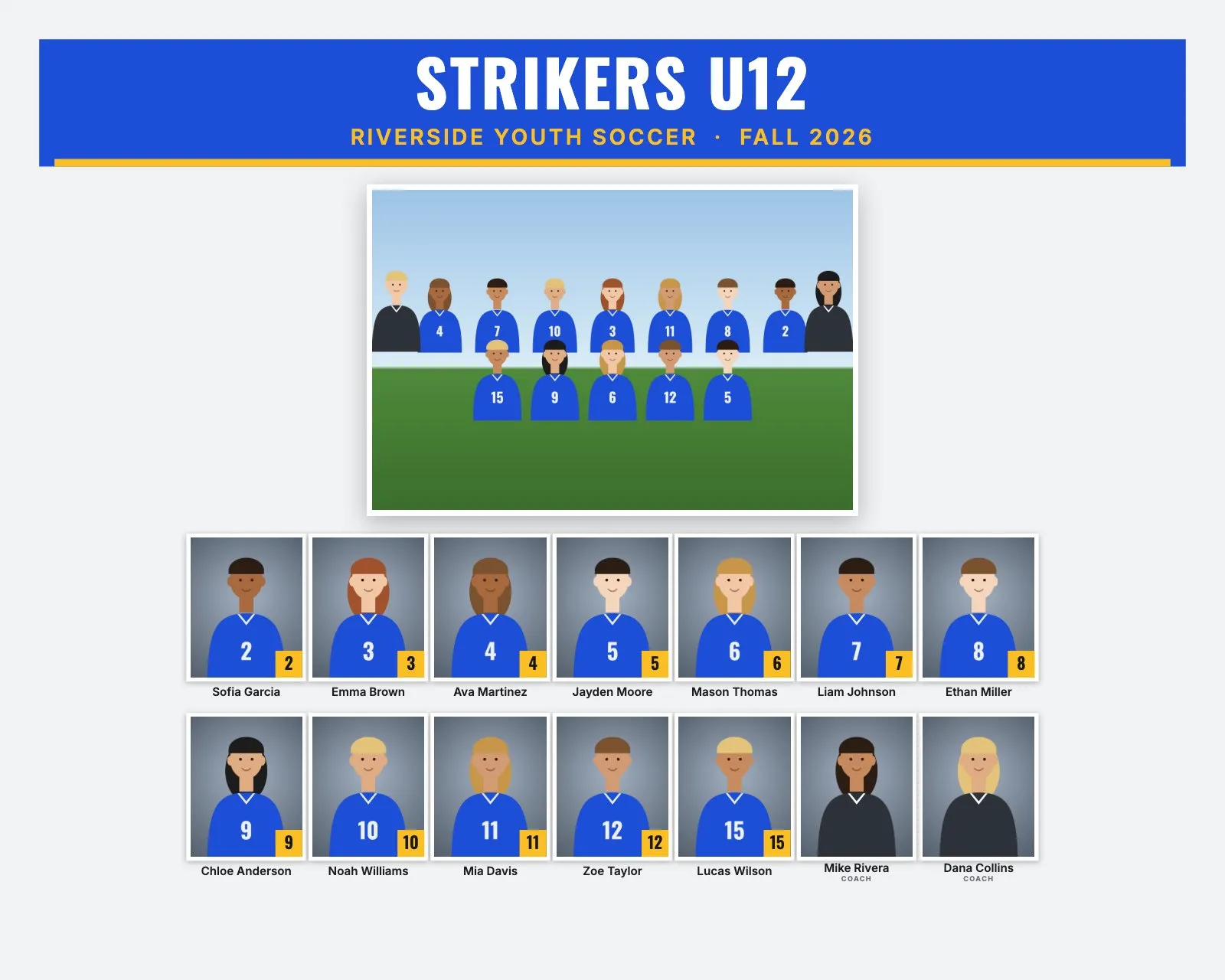
A soccer club is often the biggest job of the season: many teams, from 4v4 little kids to full 11v11 squads, photographed on a field in one or two weekends. Every team needs a composite and most families want a memory mate. Because team sizes change so much by age group, a soccer composite template with a fixed number of boxes rarely fits more than one team.
This guide covers what's different about soccer: roster sizes, print sizes, field light, and how to build every team's composite at once.
Soccer roster sizes and the layout
Youth soccer plays small-sided games at younger ages, so rosters grow with age. Limits vary by league and club, but these ranges are common in the US. The last column shows what RosterFrame's automatic layout does with that many people, coaches included.
| Age group | Format | Typical roster | Good size and layout |
|---|---|---|---|
| U6 to U8 | 4v4 | 6 to 8 | 8 × 10" portrait: about 9 people in 2 rows, headshots about 1.4" wide |
| U9 to U10 | 7v7 | 10 to 12 | 10 × 8" landscape: about 13 people in 2 rows, about 0.9" wide |
| U11 to U12 | 9v9 | 12 to 16 | 10 × 8" landscape: about 16 people in 2 rows, about 0.9" wide |
| U13 and up | 11v11 | 16 to 22 | 14 × 11" landscape: about 22 people in 2 rows, about 1.1" wide |
As a rule of thumb, headshots narrower than about 0.75" on the print get hard to recognize. A 22-person 11v11 roster on 10 × 8" comes out at about 0.8", so older teams look better on 14 × 11".
Best composite size and rows for soccer
- Most rec teams (U9 to U12): 10 × 8" landscape with Rows of headshots on Automatic. It makes two balanced rows for 12 to 20 people.
- 4v4 teams: 8 × 10" portrait. With only 8 or 9 people, landscape puts everyone in one long row of small faces. Portrait gives two rows of bigger headshots.
- 11v11 and high school: 14 × 11" landscape keeps faces above 1" for rosters up to about 22.
The design, including the print size, applies to every team in a job. If your little kids get 8 × 10" and the older teams 14 × 11", export the older teams first, then switch the size and export the 4v4 teams one by one with "This team" in the export window.
Jersey numbers or positions?
Numbers work well on soccer composites. Most young players rotate positions all season, so positions would be out of date by the time the prints arrive. RosterFrame prints names and jersey numbers, not positions. Sorting by jersey number usually puts the goalkeeper (often #1) first. Some rec programs hand out shirts without numbers, or with the same number on several teams. For those, turn off "Show jersey numbers".
Goalkeepers wear a different color. That's fine: "Match jersey colors" looks at the jersey area of up to 16 player headshots, so one keeper jersey doesn't change the team colors.
Picture day tips for soccer
- Watch the sun. Morning sessions on an open field often start in low, hard sun. Turn players so the sun is behind them and use flash for fill, or set up in open shade. Squinting and dark eye sockets are the most common soccer headshot problem.
- Keep the background the same for everyone. A portable backdrop is safest. Without one, pick a spot with a distant tree line instead of a parking lot or goal nets.
- Plan for wet grass. The front row usually kneels in the team photo. Bring a tarp or a mat for early sessions.
- Bring a comb and hair ties. Fields are windy, and the same hair goes into the composite, the memory mate and the trading card.
- Shoot the youngest teams quickly. 4v4 players lose patience fast. Do the team photo first, then the headshots.
- Log every team. Clubs often run 20 or more teams in a day. Write down the file numbers for each team so the folders are easy to sort later.
Memory mate and trading card ideas for soccer
- Side-by-side memory mate (10 × 8" or 7 × 5"): a pose with the ball under one arm or on the foot, next to the team photo. Frame the portrait a little loose so the ball fits.
- Player card memory mate (8 × 10" or 5 × 7"): a big portrait with a name banner and number badge. It suits older players and travel teams.
- Trading cards (2.5 × 3.5"): younger players like swapping them with teammates at the end-of-season party.
- Team poster (18 × 24"): a gift for the coach, or for the club's tent at tournaments.
- Extra line: add "Champions" or "Spring Cup Finalists" for teams that won something, or the team sponsor's name.
How to make soccer composites in RosterFrame
- Export your selects as JPEGs into one folder per team. The folder name becomes the team name on the print, so name it like
U10 Girls Strikers. - Name the team photo
Team.jpg. Name headshots likeAva_Martinez_4.jpg, or keep the camera names and add a roster CSV from the club's registration export. See how to name sports photos. - Put "Coach" in coaches' file names, like
Coach_Dana_Collins.jpg. - Open RosterFrame, click "Choose team folders" and pick the whole club folder. Every sub-folder becomes a team.
- On the Composite tab, choose a style and the print size. Click "Match jersey colors", or pick the colors by hand.
- Type the club name under "League or club" and the season, like Fall 2026. Set Order to "By jersey number" or "By last name". Leave Rows of headshots on Automatic.
- Check the Memory mates and More products tabs. The same design is used for trading cards, magazine covers, buttons and team posters.
- Download each team's name check sheet and send it to the coach. Then click Export, pick "All teams" and the products you sell.
Every headshot gets the same crop, so faces line up across the grid. If one photo is off, open it from the roster and drag or zoom to fix just that one.
Recommended settings
| Style | Classic for rec clubs, Bold for travel teams |
|---|---|
| Print size | 10 × 8" for most teams, 8 × 10" for 4v4, 14 × 11" for 11v11 |
| Rows of headshots | Automatic |
| Order | By jersey number or by last name |
| Label for coaches and staff | Coach |
| Show jersey numbers | On, or off for shirts without numbers |
Composite guides for other sports
Teams without jersey numbers? See dance, cheer and swim team composites. All guides are on the guides page.
Try it with your own photos. Free during beta, no signup, runs in your browser. Your photos never leave your computer.
Open RosterFrame