Baseball team composite template and memory mates
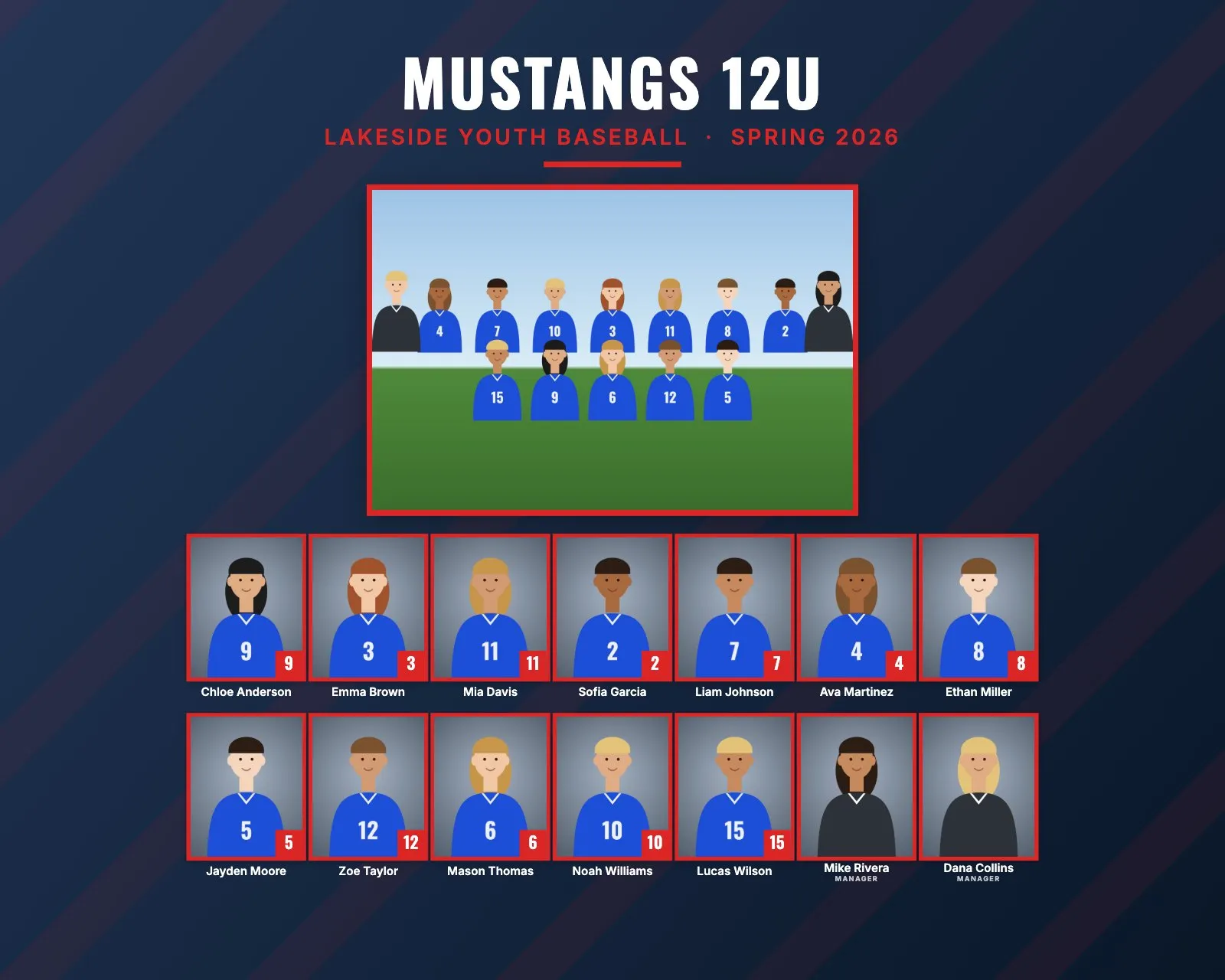
Baseball has a long tradition of team pictures and player cards. Youth leagues usually want a composite for every team, plus memory mates and trader cards for every player, often photographed in one weekend before opening day. Rosters are fairly even across a league, and a league usually means many teams photographed back to back.
Baseball roster sizes and the layout
Roster sizes vary by league and age. Add the manager and coaches, because each one gets a headshot on the composite.
| Level | Typical roster | Good size and layout |
|---|---|---|
| Tee ball and coach pitch | 10 to 12 | 10 × 8": about 13 people in 2 rows, headshots about 0.9" wide |
| Youth, ages 9 to 12 | 11 to 14 | 10 × 8": about 16 people in 2 rows, about 0.9" wide |
| 13U to 15U and travel | 12 to 16 | 10 × 8" or 14 × 11": about 18 people in 2 rows, 0.9" or 1.25" wide |
| High school varsity | 15 to 25 | 14 × 11": 20 to 25 people in 2 rows, about 0.9" to 1.2" wide |
Best composite size and rows for baseball
For a typical youth roster, 10 × 8" landscape with Rows on Automatic gives two rows of 7 or 8. Many leagues buy frames with a landscape 10 × 8" opening, which makes it the safe default.
If you sell portrait frames, 8 × 10" works well too. With 13 to 17 people, RosterFrame's layout gives slightly larger headshots on 8 × 10" (about 1" wide, three rows) than on 10 × 8" (about 0.9", two rows). For high school rosters, move up to 14 × 11".
Managers, coaches and the label
In many youth baseball programs the head coach is called the manager. Set "Label for coaches and staff" to Manager and every non-player is labeled that way. The label applies to all non-players in the job, so if your league uses both "Manager" and "Coach", pick the one the league prefers.
To mark someone as a non-player, put "Coach" in the file name (Coach_Mike_Rivera.jpg), or write Manager or Coach in the Role column of the roster CSV. Non-players are always placed after the players.
Jersey numbers or positions?
Youth players move around the field, and many play several positions in one game. Jersey numbers stay the same all season, so they belong on the print. RosterFrame prints names and numbers, not positions. Sort by jersey number for a lineup look, or by last name to match the league's roster.
Picture day tips for baseball
- Decide caps on or off, for the whole league. Mixed is what looks wrong on a composite. With caps on, the bill throws a shadow over the eyes: ask players to tip the bill up a little, and use fill flash or a reflector.
- Shoot before the game, not after. White pants get dirty fast, and it shows in the team photo.
- Avoid the backstop. Chain-link fences and dugouts make a busy, dark background. Use a backdrop, or face players toward the outfield with open sky or trees behind them.
- Use the spring clouds. Overcast days give soft, even light. On sunny days, shoot in shade or with the sun behind the players plus fill flash.
- Gloves and bats in the team photo: either everyone or nobody. Gloves on the same hand, bats held the same way.
Memory mate and trader card ideas for baseball
- Trader cards (2.5 × 3.5"): the classic baseball add-on. Some travel teams trade them with other teams at tournaments. Tick "Add 1/16" bleed for the lab" if your lab trims cards.
- Player card memory mate (8 × 10" or 5 × 7"): looks like an oversized baseball card, with a number badge and the team photo as an inset.
- Side-by-side memory mate: a batting stance or a glove at the chest, next to the team photo.
- Magazine cover (8 × 10"): a "season preview" cover for each player.
- Buttons (2.25" or 3"): for parents and grandparents in the stands.
- Extra line for sponsors: many youth teams have a local business sponsor. Put "Sponsored by" and the name in the Extra line, or "Champions" at the end of the season.
How to make baseball composites in RosterFrame
- Make one folder per team, named as it should print, like
Mustangs 12U. Name the team photoTeam.jpg. - Name headshots like
Liam_Johnson_7.jpg, or use a roster CSV with a File column. - Open RosterFrame and click "Choose team folders". Pick the league folder.
- On the Composite tab, pick a style and 10 × 8". Click "Match jersey colors" or pick the colors by hand.
- Enter the league name and season, like Spring 2026. Set "Label for coaches and staff" to Manager if your league uses it.
- Open More products, choose Trading card and check a few players.
- Send each manager the name check sheet. Then Export: composites, memory mates and trading cards for all teams.
Every headshot gets the same crop, so faces line up across the grid. If one photo is off, open it from the roster and drag or zoom to fix just that one.
Recommended settings
| Style | Classic or Bold |
|---|---|
| Print size | 10 × 8" for youth teams, 14 × 11" for high school |
| Rows of headshots | Automatic |
| Order | By jersey number or by last name |
| Label for coaches and staff | Manager or Coach |
| Extra line | Sponsor name or Champions (optional) |
Composite guides for other sports
Teams without jersey numbers? See dance, cheer and swim team composites. All guides are on the guides page.
Try it with your own photos. Free during beta, no signup, runs in your browser. Your photos never leave your computer.
Open RosterFrame