Lacrosse team composite template and memory mates
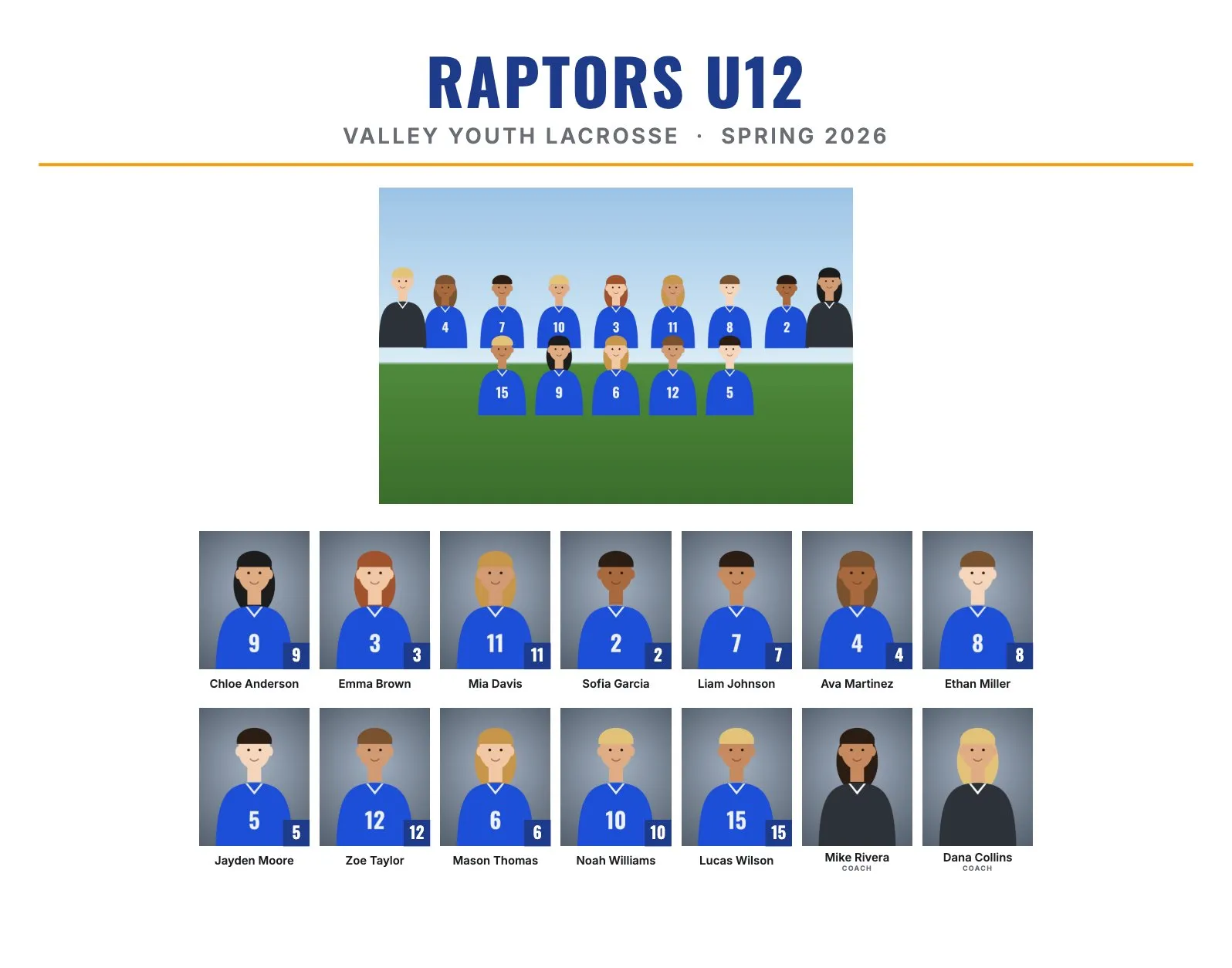
Lacrosse is a spring sport with big rosters. Boys' teams play 10 on the field and girls' teams 12 at the older levels, so rosters of 20 to 30 are common, and high school programs can be bigger. Add helmets, goggles and sticks up to six feet long, and lacrosse picture days need a plan.
Lacrosse roster sizes and the layout
| Level | Typical roster | Good size and layout |
|---|---|---|
| Youth | 15 to 25 | 14 × 11": 17 to 25 people in 2 rows, headshots about 0.9" to 1.25" wide |
| High school varsity | 25 to 40 | 11 × 14": 30 to 40 people in 4 rows, about 0.94" to 1.05" wide |
On 10 × 8", a 25-person roster drops to about 0.68" per headshot, which is small. For lacrosse, start at 14 × 11" or 11 × 14".
Best composite size and rows for lacrosse
Use 14 × 11" landscape for youth teams up to about 25 people. For bigger high school rosters, 11 × 14" portrait gives larger headshots and a larger team photo than 14 × 11" in RosterFrame's layout. Leave Rows of headshots on Automatic: it already picks the row count with the biggest faces.
If a program has boys' and girls' teams or several levels, make one folder for each team. Each becomes its own composite.
Jersey numbers or positions?
Numbers. Attack, midfield, defense and goalie are useful on a game roster, but RosterFrame prints names and numbers only, which is what parents look for on a composite. Sort by jersey number or last name.
Picture day tips for lacrosse
- Helmets off, goggles off. Boys' helmets and girls' goggles hide the face, so headshots are without them. Mouthguards out too.
- Sticks the same way. In the team photo, ask everyone to hold the stick in the same hand with the head up, or lay sticks in front of the front row. Long poles stick out, so frame wider.
- Memory mate poses with sticks: hold the stick across the body or let it lean on the shoulder. Frame loose, so the stick head isn't cut off.
- Spring weather: early season can be cold, windy or wet. Bring a pop-up tent for the headshot station and a backup indoor spot.
- Outdoor light: open shade or the sun behind the players, with fill flash. Keep the background the same for every headshot.
Memory mate and trading card ideas for lacrosse
- Side-by-side memory mate (10 × 8" or 7 × 5"): a portrait with the stick, next to the team photo.
- Trading cards (2.5 × 3.5"): youth players trade them with teammates and at tournaments.
- Team poster (18 × 24"): for seniors, the coach or the team banquet.
- Magazine cover (8 × 10"): a fun extra for seniors.
How to make lacrosse composites in RosterFrame
- Make one folder per team, named like
Raptors U12orGirls Varsity, with the team photo asTeam.jpg. - Name headshots like
Zoe_Taylor_12.jpg, or keep camera names and use a roster CSV. - Open RosterFrame and click "Choose team folders".
- On the Composite tab, choose a style and 14 × 11" or 11 × 14".
- Click "Match jersey colors", then enter the club or school name and the season, like Spring 2026.
- Check the Memory mates and More products tabs, send the coach the name check sheet, and export.
Every headshot gets the same crop, so faces line up across the grid. If one photo is off, open it from the roster and drag or zoom to fix just that one.
Recommended settings
| Style | Clean, Classic or Bold |
|---|---|
| Print size | 14 × 11" for youth, 11 × 14" for 30 people or more |
| Rows of headshots | Automatic |
| Order | By jersey number or by last name |
| Label for coaches and staff | Coach |
| Headshots | No helmets, goggles or mouthguards |
Composite guides for other sports
Teams without jersey numbers? See dance, cheer and swim team composites. All guides are on the guides page.
Try it with your own photos. Free during beta, no signup, runs in your browser. Your photos never leave your computer.
Open RosterFrame