Football team composite template for big rosters
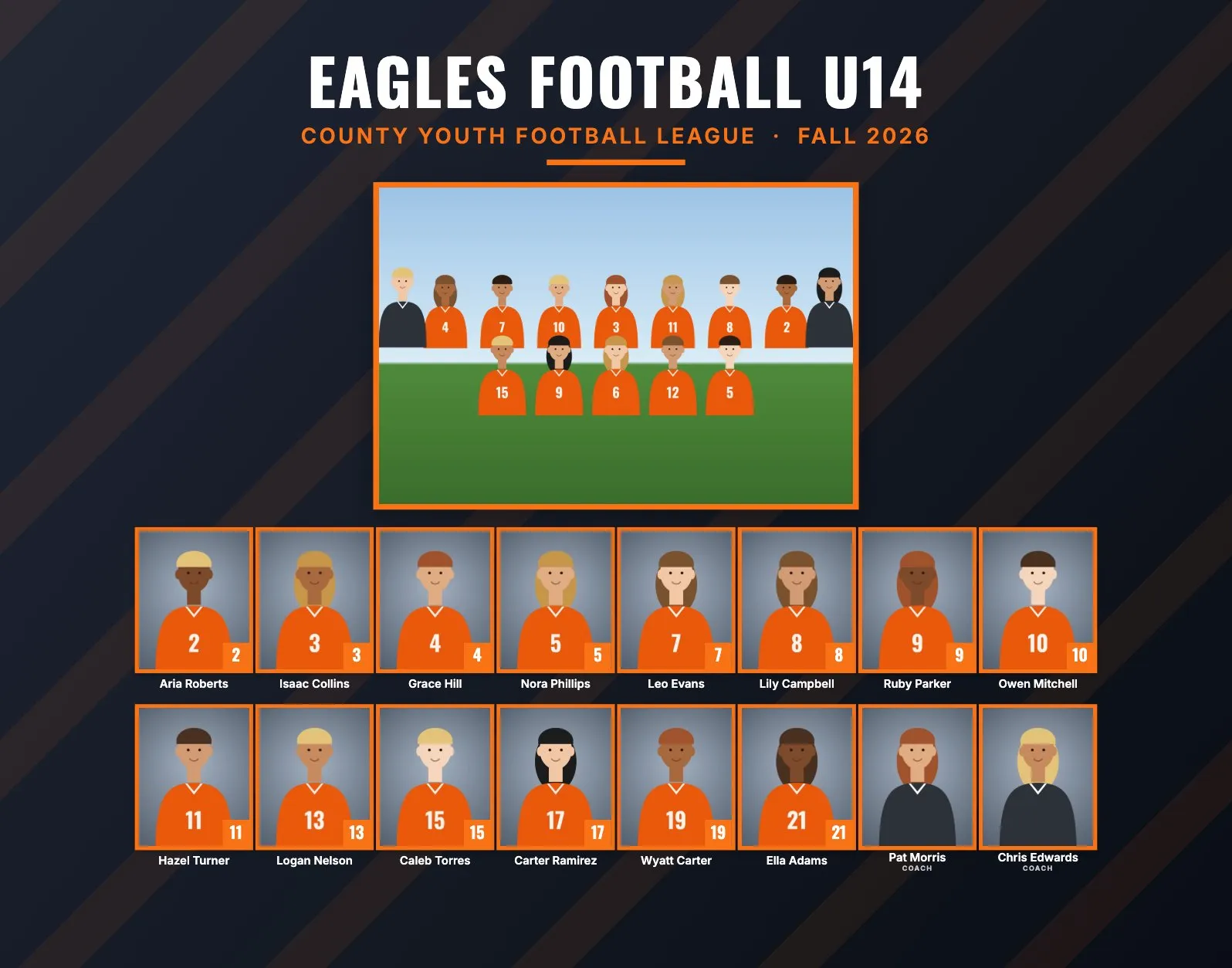
Football has the biggest rosters in youth sports, and often the biggest coaching staffs. A composite template built for 20 boxes doesn't work for a 45-player varsity team, and placing 45 headshots and typing 45 names by hand is a long evening, per team. The main question for football is print size: how to fit everyone and still recognize the faces.
Football roster sizes and the layout
Roster sizes vary a lot by program. Count the coaches too: football teams often have several coaches, and each one gets a headshot.
| Level | Typical roster | Good size and layout |
|---|---|---|
| Flag football | 6 to 10 | 8 × 10" portrait: about 10 people in 2 rows, headshots about 1.36" wide |
| Youth tackle | 20 to 35 | 11 × 14" or 14 × 11": about 30 people, about 1" or 0.93" wide |
| High school varsity | 40 to 60 or more | 11 × 14": about 50 people in 5 rows, about 0.84" wide |
Best print size for a 40-person roster
Here is what RosterFrame's automatic layout does with 40 people (players and coaches) and a team photo on each size:
| Print size | Rows | Headshot width | Team photo |
|---|---|---|---|
| 10 × 8" landscape | 3 | about 0.62" | about 3.4 × 2.3" |
| 8 × 10" portrait | 4 | about 0.68" | about 4.1 × 2.8" |
| 14 × 11" landscape | 3 | about 0.86" | about 4.7 × 3.1" |
| 11 × 14" portrait | 4 | about 0.94" | about 5.8 × 3.9" |
So for 30 people or more, skip 10 × 8". Both large sizes work: 11 × 14" portrait gives the biggest faces and the biggest team photo, and 14 × 11" landscape fits landscape frames and wall displays. Leave Rows of headshots on Automatic. It already picks the row count with the largest faces, and forcing more rows makes them smaller.
For very large programs (70 or more people), make a folder per squad, like Varsity, JV and Freshman. Each folder becomes its own composite, and every face stays a usable size.
Jersey numbers or positions?
Football programs list players by number, and fans know them that way. Set Order to "By jersey number" for a game-day roster look. RosterFrame prints names and numbers, not positions. Coaches are always placed after the players.
With 40 or more names, typos are almost guaranteed. The name check sheet puts every photo, name and number on letter pages, 25 people per page, so the head coach can tick them off before you print.
Picture day tips for football
- Helmets off for headshots. Faces have to be visible. Helmets work for memory mate poses: under the arm or on the hip.
- Pads on or off, for everyone. Jerseys over shoulder pads give the classic football look, but make shoulders much wider. Frame headshots a little looser so the shoulders aren't cut off at odd points.
- Bring a comb and a mirror. Helmet hair is real.
- Beat the heat. Preseason picture days are often in late summer. Shoot early or in the evening, in shade, and bring blotting papers for shiny faces.
- Use the bleachers for the team photo. With 40 or more players, bleachers are the easiest risers. Stand on a ladder so the back rows aren't hidden, and shoot wider than you think you need.
- Keep a shot log. With big rosters, mix-ups happen. Photograph a name card before each player, or keep a list of file numbers.
Memory mate and product ideas for football
- Team poster (18 × 24"): for the locker room, the banquet or senior night.
- Magazine cover (8 × 10"): a "cover athlete" print for every player.
- Player card memory mate: a portrait with the helmet under the arm, a name banner and a number badge.
- Buttons (2.25" or 3"): for parents in the stands on Friday nights.
- Trading cards (2.5 × 3.5"): popular in youth tackle and flag leagues.
How to make football composites in RosterFrame
- Make one folder per team or squad, named like
Eagles Football U14orVarsity. Name the team photoTeam.jpg. - Name headshots like
Wyatt_Carter_19.jpg. For big rosters a roster CSV is usually faster than renaming: keep the camera names and match them by the File column. - Mark coaches with "Coach" in the file name, or Coach in the CSV Role column.
- Open RosterFrame and click "Choose team folders".
- On the Composite tab, pick Bold or Classic and 11 × 14" or 14 × 11". Leave Rows of headshots on Automatic.
- Click "Match jersey colors", enter the league or school name and the season, and set Order to "By jersey number".
- Download the name check sheet for the head coach. Fix any names, then export.
Every headshot gets the same crop, so faces line up across the grid. If one photo is off, open it from the roster and drag or zoom to fix just that one.
Recommended settings
| Style | Bold or Classic |
|---|---|
| Print size | 11 × 14" or 14 × 11" for 30 people or more, 8 × 10" for flag football |
| Rows of headshots | Automatic |
| Order | By jersey number |
| Label for coaches and staff | Coach |
| Before printing | Name check sheet for the head coach |
Composite guides for other sports
Teams without jersey numbers? See dance, cheer and swim team composites. All guides are on the guides page.
Try it with your own photos. Free during beta, no signup, runs in your browser. Your photos never leave your computer.
Open RosterFrame