Hockey team composite template and memory mates
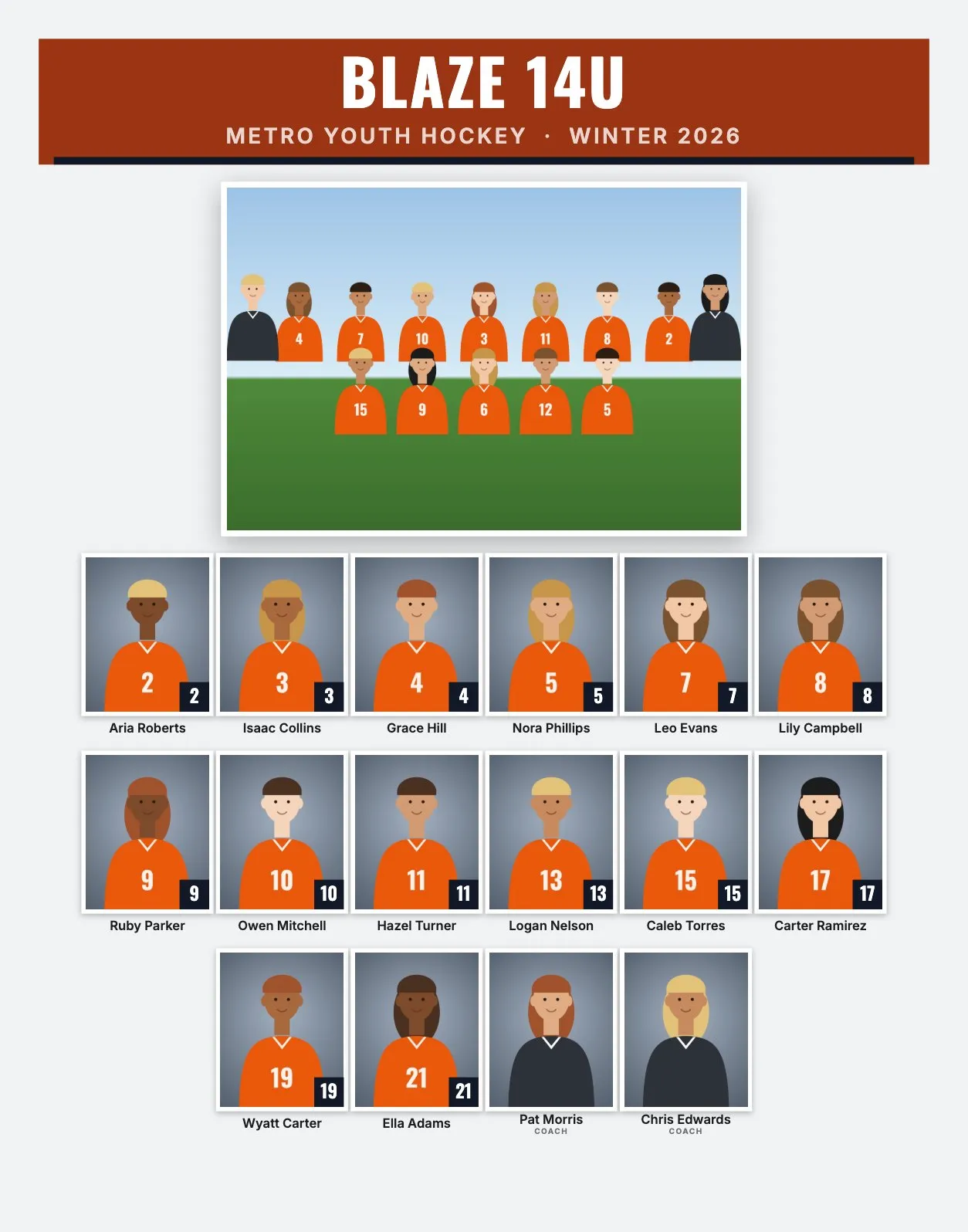
Hockey picture days are short and busy: ice time is expensive, so photos usually happen around a practice slot, with players changing in and out of gear. A good plan for helmets, light and the team photo on the ice matters more than in most sports. Rosters are mid-sized, with two goalies and often a team manager besides the coaches.
Hockey roster sizes and the layout
| Level | Typical roster | Good size and layout |
|---|---|---|
| Youth, 8U to 14U | 12 to 18 | 14 × 11" or 11 × 14": 15 to 20 people, headshots about 1.2" to 1.4" wide |
| High school and 16U to 18U | 18 to 25 | 11 × 14": 22 to 28 people in 3 or 4 rows, about 1" to 1.2" wide |
A 20-person roster on 10 × 8" still works (2 rows, headshots about 0.87" wide), but 11 × 14" portrait gives about 1.34" and 14 × 11" landscape about 1.21".
Goalies and the order of players
Sorting by jersey number puts #1 first and goalie numbers like 30 or 31 at the end. If you'd rather show the goalies together, set Order to "Custom order" and move players with the arrows in the roster. Coaches and staff are always placed after the players.
RosterFrame prints names and numbers, not positions or captain letters. If the team manager should appear with the coaches, put "Coach" in the file name or Manager in the CSV Role column. The label for all non-players is set once, for example Coach.
Picture day tips for hockey
- Helmets off for headshots. Cages and visors hide the face. Shoot headshots before players put their helmets on, or bring a comb and a mirror for helmet hair.
- Jersey over shoulder pads, or not: decide for the whole team. Pads make the shoulders wide, so frame a little looser.
- Shoot headshots off the ice. Rink light is often uneven and cold in color. A lobby or hallway with a backdrop and your own flash gives the same look for every team.
- Watch for fog on the lens. Moving gear from a cold rink to a warm lobby causes condensation. Keep the camera in a closed bag and let it warm up before shooting.
- Team photo on the ice: back row standing, front row kneeling, goalies in full gear at the ends or in front. Wear shoe grips or ice cleats yourself, and frame a little wide for sticks.
Memory mate and trading card ideas for hockey
- Trading cards (2.5 × 3.5"): hockey cards are a natural fit, and some travel teams trade them at tournaments.
- Player card memory mate (8 × 10" or 5 × 7"): a portrait with the stick, a name banner and number badge.
- Team poster (18 × 24"): for the locker room or the team party.
- Buttons (2.25" or 3"): for parents in cold stands, worn on the jacket.
How to make hockey composites in RosterFrame
- Make one folder per team, named like
Blaze 14UorSquirt A, with the team photo asTeam.jpg. - Name headshots like
Owen_Mitchell_10.jpg, or keep camera names and use a roster CSV from the association's registration export. - Open RosterFrame and click "Choose team folders".
- On the Composite tab, pick a style and 11 × 14" or 14 × 11".
- Click "Match jersey colors", enter the association name and the season, and choose the order.
- For custom order, open the roster and move goalies with the arrows.
- Send each coach the name check sheet, then export composites, memory mates and cards.
Every headshot gets the same crop, so faces line up across the grid. If one photo is off, open it from the roster and drag or zoom to fix just that one.
Recommended settings
| Style | Classic or Bold |
|---|---|
| Print size | 11 × 14" portrait or 14 × 11" landscape |
| Rows of headshots | Automatic |
| Order | By jersey number, or Custom order to group goalies |
| Label for coaches and staff | Coach |
| More products | Trading cards 2.5 × 3.5", team poster 18 × 24" |
Composite guides for other sports
Teams without jersey numbers? See dance, cheer and swim team composites. All guides are on the guides page.
Try it with your own photos. Free during beta, no signup, runs in your browser. Your photos never leave your computer.
Open RosterFrame