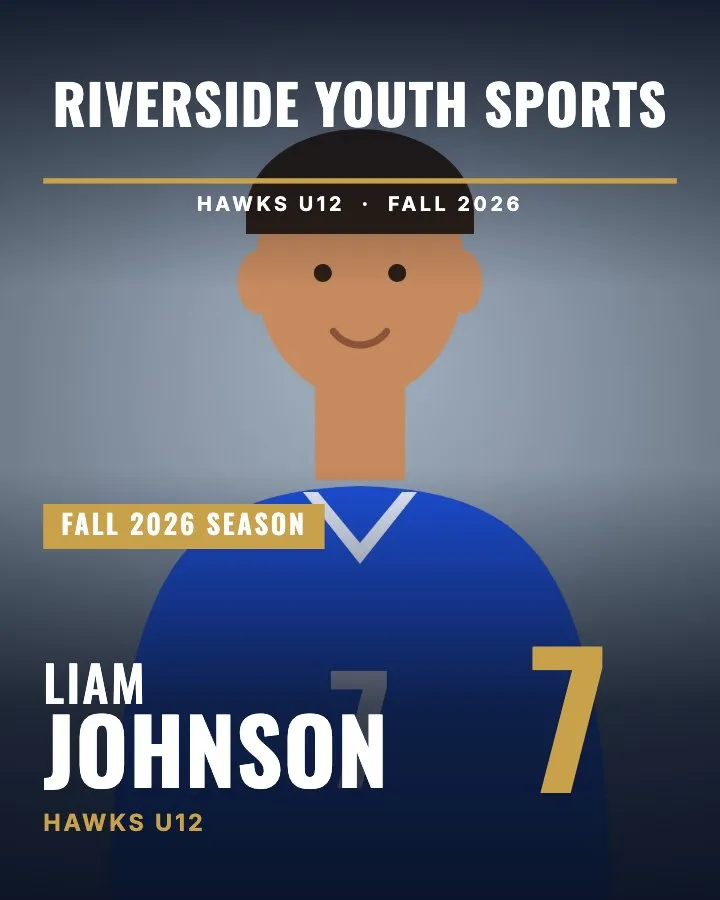
What size is a sports magazine cover?
RosterFrame covers are 8 × 10" portrait prints, the same size as a standard sports print, so any lab can print them and they fit common 8 × 10 frames. At 300 dpi that is 2400 × 3000 pixels. The file is the exact print size with no bleed.
| Trim size | 8 × 10" portrait |
|---|---|
| Pixels at 300 dpi | 2400 × 3000 |
| Bleed | None. The file is the exact print size. |
| Format | JPEG (quality 93), sRGB, 300 dpi set in the file |
| File names | Martinez_Ava_4 - Magazine Cover.jpg, one per person with a photo, in a folder per team |
What goes on the cover?
- Masthead: your league or club name in big letters (the team name if you leave it empty), with a line in the accent color.
- Strap line: team name (when a league name is set), your extra text (for example "Champions" or a sponsor) and the season.
- Cover tag: a box with your extra text, or the season (for example "Fall 2026 season") if there is none.
- Name and number: first name, then the last name in large type, the team name below, and the jersey number in the accent color.
- Logo: your league logo near the top right, if you add one.
The top and bottom of the photo are shaded so the white text stays readable on any background.
How do I make a cover for every player?
- Drop your team folders into RosterFrame. Names and numbers come from the file names or a roster CSV.
- Open More products and pick Magazine cover. Set the league name, season and extra text once for the whole job.
- Export and tick Magazine covers. Every person with a photo gets a cover.
What photo works best for a magazine cover?
The cover uses the same headshot as the composite and the memory mate, stretched to fill the whole 8 × 10. A vertical photo with some space above the head works best, because the masthead sits at the top. If a face is too high or too low, drag or zoom that player's photo once and every product follows.
Want more add-ons from the same photos? See trading cards, photo buttons and team posters.
How this guide was made: written by Jakob, who builds RosterFrame. Print sizes and pixel counts were checked against the app's export settings; the example images were rendered in RosterFrame from sample photos. First published .
Try it with your own photos. Free during beta, no signup, runs in your browser. Your photos never leave your computer.
Open RosterFrameRelated guides
All guides on this topic: Memory mates & cards.